
metoro-onprem chart and managed by the Altinity ClickHouse Operator.
If ClickHouse is externally managed, change resources through the team and tooling that operate that ClickHouse service. The Metoro chart does not manage external ClickHouse pod resources.
This page is about ClickHouse server resources. ClickHouse Keeper is a separate lightweight component and normally does not need tuning as part of ClickHouse query or ingest capacity changes.
Check The Dashboard First
Before changing resources, open theMetoro Hub - ClickHouse dashboard in Metoro and review the Global Resource Usage - CHI section.
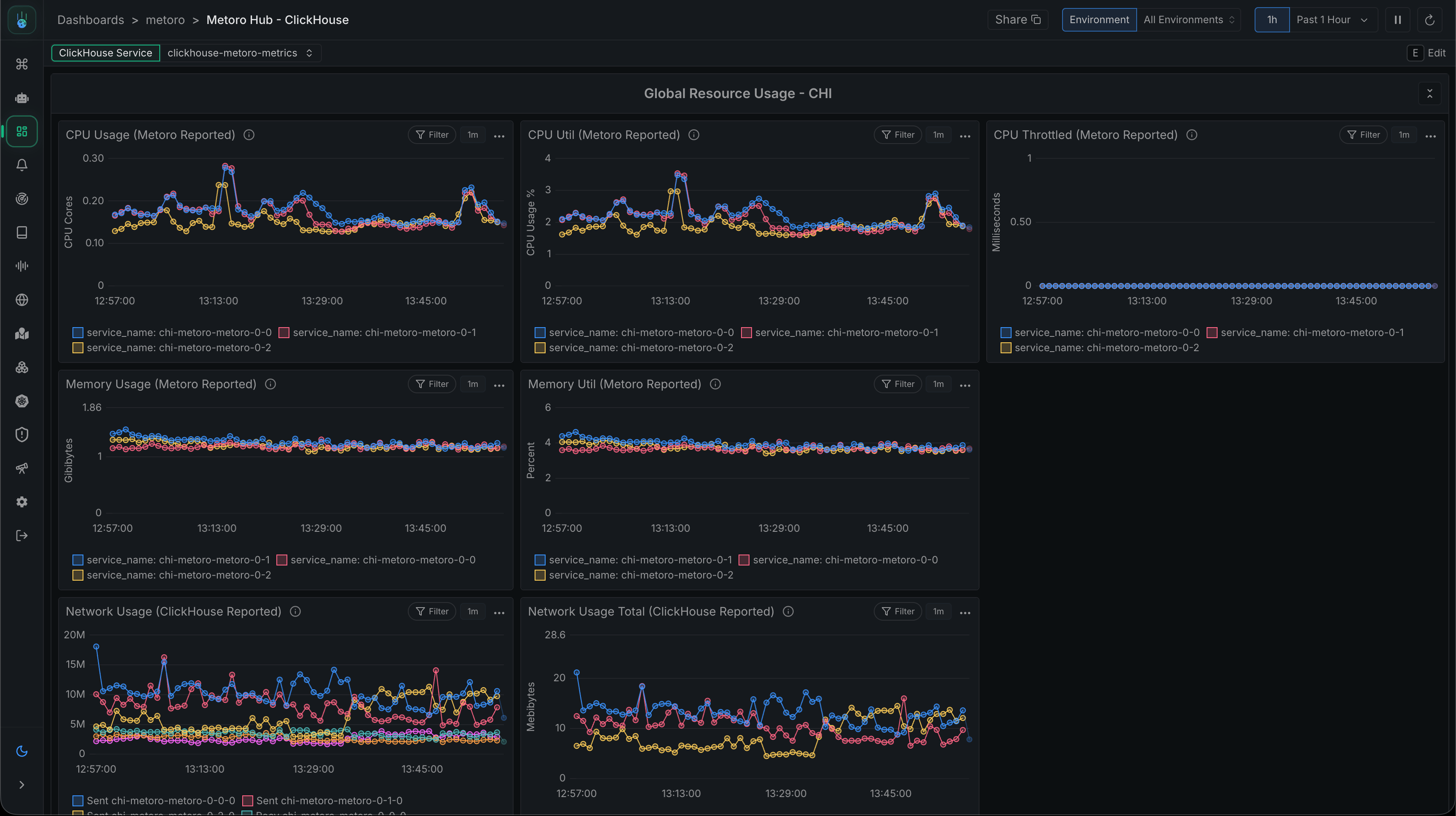
CPU Usage (Metoro Reported)shows how many CPU cores each ClickHouse instance is using.CPU Util (Metoro Reported)shows CPU usage as a percentage of the configured CPU limit.CPU Throttled (Metoro Reported)shows whether ClickHouse is being limited by its CPU limit.Memory Usage (Metoro Reported)shows memory RSS for each ClickHouse instance.Memory Util (Metoro Reported)shows memory RSS as a percentage of the configured memory limit.
What To Change
Theclickhouse.bundled.resources Helm values control ClickHouse server CPU and memory requests and limits. The chart renders these values into the ClickHouse pod template on the ClickHouseInstallation named metoro.
Change the values in metoro-hub-values.yaml:
Increase Or Decrease
Increase CPU or memory when the dashboard shows sustained pressure and ClickHouse symptoms line up with that pressure. Before applying larger requests, confirm the Kubernetes cluster has nodes that can schedule the new ClickHouse pod shape. Decrease CPU or memory only after observing stable low utilization over a representative period. Downsize gradually and watch the dashboard after each change. Do not reduce memory below the amount needed for normal queries and merges, and do not lower CPU limits if ClickHouse is already showing throttling. Changing CPU or memory does not resize PVCs. To increase hot PVC capacity, see Upscale Hot PVC. Changing CPU or memory does not add replicas. To change replica count, see Scale Replicas.Apply The Change
Apply the updated values with the same Helm release and chart version used for the hub:What Happens
After the Helm upgrade, theClickHouseInstallation named metoro updates its ClickHouse pod template.
The Altinity ClickHouse Operator reconciles the updated ClickHouseInstallation. Because pod resources are part of the pod template, the operator may restart ClickHouse pods so they pick up the new CPU and memory values.
Expect a rolling reconciliation rather than every ClickHouse pod restarting at once. If any pod or node maintenance is involved, follow Taking Pods Offline so Keeper keeps quorum and at least one ClickHouse pod stays ready.
If pods become pending after increasing requests, check node capacity, node selectors, taints, topology spread constraints, and recent scheduler events. The requested pod shape must fit on available Kubernetes nodes.
Verify The Rollout
Check that theClickHouseInstallation exists and is being reconciled:
Metoro Hub - ClickHouse dashboard and verify that the original signal improved. CPU throttling should drop after raising an undersized CPU limit. CPU or memory utilization should move to the expected range after increasing limits. If the dashboard does not improve, the bottleneck may be disk IO, object storage latency, query shape, ingest volume, or replica count rather than CPU or memory sizing.