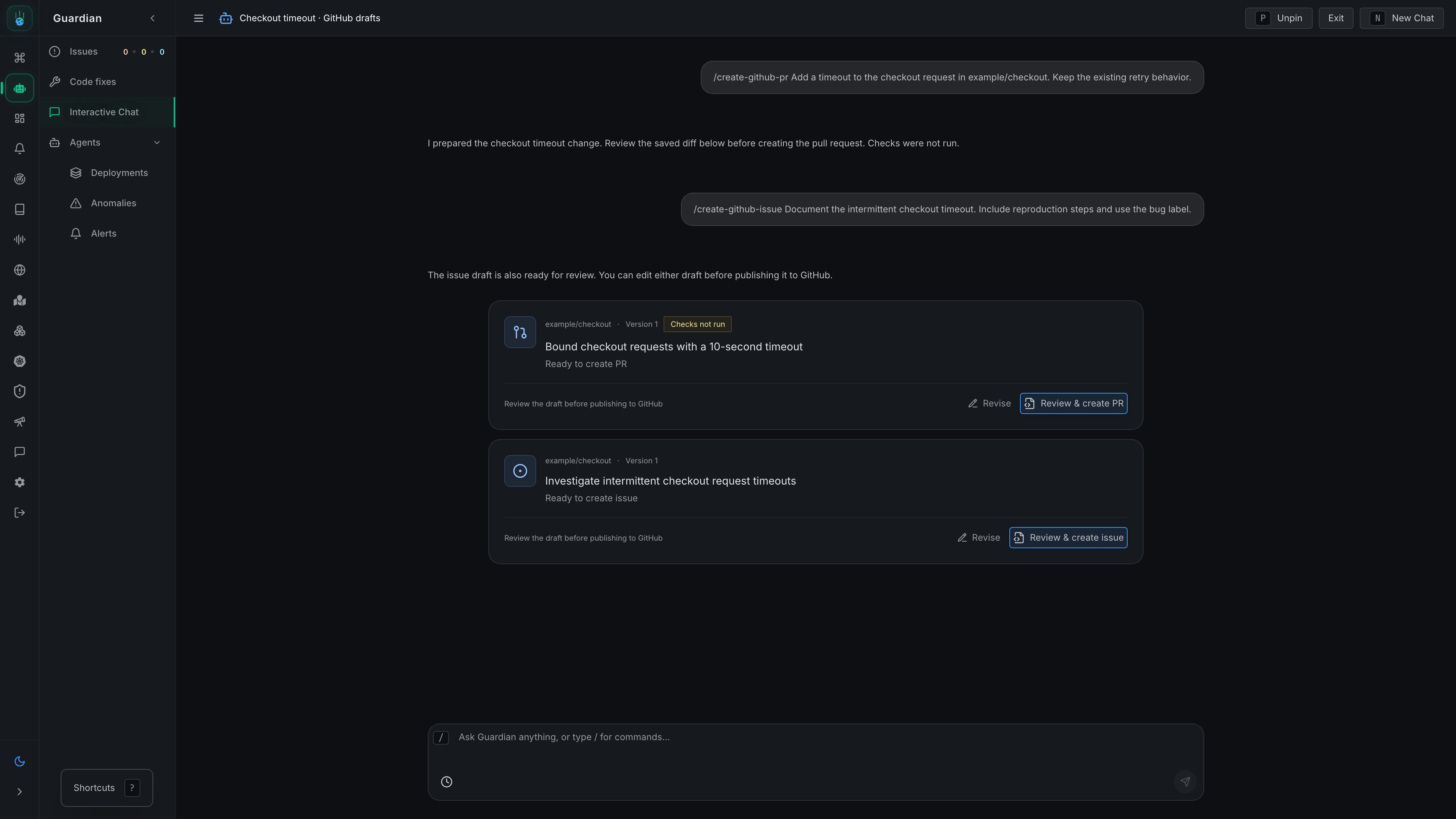
Prepare pull requests and GitHub issues with Guardian, then review and publish them yourself
When GitHub drafts are enabled for your organization, use these commands in any Guardian conversation. An investigation is optional. Everything after the command is an instruction for that request.
/create-github-pr Fix the timeout handling in acme/checkout. Keep the existing retry behavior./create-github-issue Document the checkout failure we discussed in acme/checkout. Include the evidence and add the bug label.
Type / in the composer to see the commands. Guardian continues the same conversation with its existing context. If the repository is unclear, it asks you to choose one; your reply continues the pending request.
Guardian checks out an authorized repository in a temporary workspace, edits the files, commits locally, and saves a CodeDiff. It does not push a branch or create a pull request.The command authorizes those local edits and commits; no command-approval card is needed to prepare the draft. You review the saved changes before publishing them to GitHub.The Ready to create PR card opens a review dialog containing the saved changes. Review the diff, edit the title and description, and choose the new branch name. Click Create PR to publish with your permissions. The card then links to the pull request.
PR drafts are labeled Checks not run. This version does not run repository tests, builds, scripts, or dependency installation. Validate the generated changes through your normal development and CI process.
This version supports changes to regular text files, including additions, edits, deletions, and renames. Binary files, executable mode changes, symlinks, and submodules are rejected. If the target branch has moved since preparation, start a new /create-github-pr command asking Guardian to regenerate the changes against the current branch.
The Ready to create issue card shows the repository and proposed title. Open it to edit the title, description, and labels, then click Create issue. Guardian does not create the issue itself.
Click Revise, describe what should change, and send the command. Guardian saves a new draft version. A PR revision recreates the checkout from the saved base and restores its patch. Each review publishes that exact version.Drafts and GitHub links survive reloading the conversation. Guardian receives the current artifact details, including publication results, on its next turn.If publication fails, the dialog shows the error. Retry with the original details so Metoro can check whether GitHub already created the artifact. To change details after an attempted publication, ask Guardian for a new version.
Your organization needs a GitHub integration with access to the repository. Reading and revising drafts follows the conversation’s access permissions, including when viewing a draft through a linked investigation. Publishing requires the existing investigations: create permission. Linking an investigation requires access to that investigation separately.This feature rolls out per organization using guardian.githubDrafts. PR preparation requires an isolated Docker or agent-sandbox Guardian runner. GitHub installation credentials stay on the Metoro server; Guardian receives fetch-only repository access and preparation tools, with no publication tool.For self-hosted runners, use the updated Guardian runner image and sandbox template together. The runner operates as a non-root user with capabilities dropped. Its inner sandbox requires unprivileged Linux namespaces and confines file writes to the temporary workspace while blocking shell network access. Repository fetches go through the separate authenticated workspace helper. Hosts that block these namespaces cannot run PR preparation; ordinary chat remains available.Coding commands and diff capture can read only their checkout and required system files. Shells do not inherit authentication variables and cannot read sibling process environments or the runner’s authentication files. These restrictions apply when starting and resuming coding sessions.
PR preparation uses a fixed coding profile so local edits and commits stay authorized inside the isolated checkout. GUARDIAN_DEVELOPER_INSTRUCTIONS customizes ordinary chat and issue preparation; it does not override the PR preparation profile.