> ## Documentation Index
> Fetch the complete documentation index at: https://metoro.io/docs/llms.txt
> Use this file to discover all available pages before exploring further.
# Kubernetes RBAC Resources
> Declare Metoro groups and access rules as Kubernetes custom resources
Metoro's [access control model](/user-management/rbac) can be managed declaratively with Kubernetes custom resources under the `rbac.metoro.io/v1alpha1` API group. This lets you keep access control in version control next to the workloads it protects, and delegate it with the Kubernetes RBAC you already have: a team with write access to a namespace can manage Metoro access for that namespace, and nothing else.
On on-prem installs, group creation is centralized in the Metoro Hub cluster. Apply `MetoroGroup` resources to the hub cluster only; the `MetoroGroup` CRD is not installed in monitored clusters. Apply telemetry and resource rule resources to the monitored cluster whose access they describe.
| Kind | Scope | Lives in | Grants | Short names |
| ------------------------------ | ---------- | --------------------- | -------------------------------------------------------------------- | ----------- |
| `MetoroGroup` | Cluster | On-prem hub cluster | Nothing — declares a group | `mgroup` |
| `MetoroNamespaceTelemetryRule` | Namespaced | Any monitored cluster | Telemetry from its namespace | `mntelrule` |
| `MetoroClusterTelemetryRule` | Cluster | Any monitored cluster | Telemetry from the whole cluster | `mctelrule` |
| `MetoroNamespaceResourceRule` | Namespaced | Any monitored cluster | Kubernetes-managed alerts/dashboards/webhooks from its namespace | `mnresrule` |
| `MetoroClusterResourceRule` | Cluster | Any monitored cluster | Kubernetes-managed alerts/dashboards/webhooks from the whole cluster | `mcresrule` |
If you know Kubernetes RBAC: a Metoro rule resource is a Role **and** a
RoleBinding in one object. Each rule creates a managed Metoro role holding
its permissions and binds that role to the groups listed in `spec.groups`.
There is no separate binding resource.
Kubernetes RBAC is the trust boundary. Anyone who can write these custom
resources in a namespace or cluster controls Metoro access for that scope —
restrict write access to them accordingly.
## Prerequisites
* The four rule CRDs are installed by the Metoro exporter chart on every monitored cluster, so you can use them on both Metoro cloud and on-prem.
* The `MetoroGroup` CRD is installed by the on-prem hub chart only. It is expected to be absent from monitored clusters.
* After you apply or edit one of these resources, the exporter takes about a minute to discover it and send it to the hub, where it is reconciled automatically. To apply a change without waiting for the next automatic reconcile, wait that minute and then click **Sync rules** in **Settings → Users & Groups** — clicking it before the change reaches the hub has no effect.
All resources created this way appear in the Metoro UI with a **Managed via K8s** label and are read-only there — Kubernetes is the source of truth, so edit or delete the custom resource instead.
## MetoroGroup
`MetoroGroup` is available on on-prem installs only, where it is applied to
and synced from the hub cluster. It is intentionally not installed in
monitored clusters, so group creation stays centralized. On Metoro cloud,
create groups in the UI under
**Settings → Users & Groups → Groups** instead.
`MetoroGroup` declares a Metoro group. It is cluster-scoped, has no `spec`, and the group name is simply the object's `metadata.name`:
```yaml theme={null}
apiVersion: rbac.metoro.io/v1alpha1
kind: MetoroGroup
metadata:
name: sre-team
```
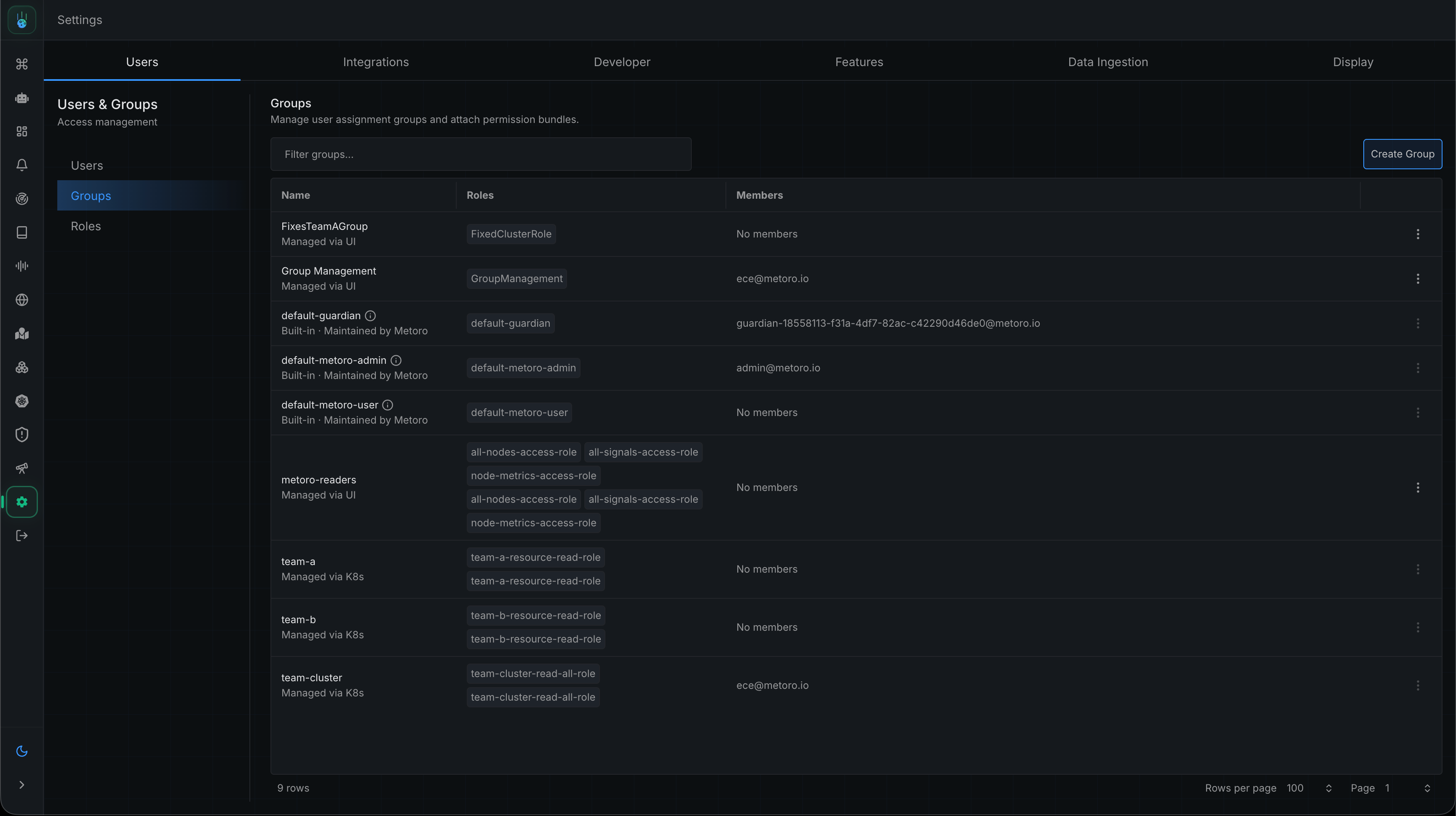
Apply this to the hub cluster and a group named `sre-team` appears in the Groups tab, tagged **Managed via K8s**. The group itself is read-only in the UI, but you still add users to it normally — via **Assign Groups** in the UI or [identity provider group sync](/user-management/authentication). If a group with the same name already exists from another source (created in the UI or by IdP sync), the `MetoroGroup` is skipped rather than taking the existing group over.
 Remember that a group grants nothing by itself — access comes from the rule resources below.
## Walkthrough
This walkthrough gives the `sre-team` group a realistic access policy in the `prod` cluster, step by step: full telemetry for the `kube-system` namespace, metrics and error/warning logs across the rest of the cluster, read access to every webhook, and permission to author dashboards in `kube-system`. Metoro identifies clusters by their environment name, so `prod` below means the environment the rule is applied in.
### Step 1: Create the group
On-prem, apply the `MetoroGroup` manifest above to the hub cluster. On cloud, create `sre-team` in **Settings → Users & Groups → Groups**. Then add the team's users to the group.
### Step 2: Grant telemetry access for a namespace
Apply a `MetoroNamespaceTelemetryRule` in the `kube-system` namespace of the `prod` cluster:
```yaml theme={null}
apiVersion: rbac.metoro.io/v1alpha1
kind: MetoroNamespaceTelemetryRule
metadata:
name: kube-system-all-signals
namespace: kube-system
spec:
groups:
- sre-team
rules:
- signals:
- logs
- metrics
- traces
- profiles
- kubernetesResources
```
Namespaced rules are automatically scoped to where they live: this rule grants the five signals only for the `kube-system` namespace in the `prod` environment. You never need to (and cannot) widen a namespaced rule beyond its own namespace — that is the point of the namespaced variant.
### Step 3: Grant metrics and problem logs across the cluster
Some access should span the whole cluster rather than one namespace. Use the cluster-scoped variant, which is scoped to the environment but not to any namespace. This rule grants two independent things: every metric everywhere, and error and warning logs everywhere.
```yaml theme={null}
apiVersion: rbac.metoro.io/v1alpha1
kind: MetoroClusterTelemetryRule
metadata:
name: cluster-metrics-and-problem-logs
spec:
groups:
- sre-team
rules:
- signals:
- metrics
- signals:
- logs
match:
matchExpressions:
- key: log.severity
operator: In
values:
- error
- warn
```
The first rule has no `match`, so it grants every metric in the environment. The second narrows logs to those whose `log.severity` is `error` or `warn`. Expressions inside one `matchExpressions` list must all be true (ANDed); separate `rules` entries — and separate rule resources — are independent grants (ORed).
Combined with Step 2, the team now sees all telemetry inside `kube-system` and, everywhere else, metrics plus error/warning logs.
`log.severity` is a user-defined value (commonly `error`, `warn`, `info`, `debug`), so its casing can vary between workloads. If your logs are inconsistent, use the `RegexIn` operator with a case-insensitive pattern such as `(?i)^err` instead of `In`.
### Step 4: See every webhook across the cluster
Resource rules grant permissions on Metoro resources that are themselves [declared as Kubernetes resources](/kubernetes-resources/kubernetes-resources) — `MetoroAlert`, `MetoroDashboard`, and `MetoroWebhook` objects. They do **not** grant access to resources created in the UI.
Use the cluster-scoped variant to cover the whole environment. This grants read-only access to every Kubernetes-managed webhook:
```yaml theme={null}
apiVersion: rbac.metoro.io/v1alpha1
kind: MetoroClusterResourceRule
metadata:
name: all-webhooks-read
spec:
groups:
- sre-team
rules:
- resources:
- webhooks
verbs:
- read
```
With no `path`, this grants `read` on `/webhooks/kubernetes-managed/prod/*` — every Kubernetes-managed webhook in the `prod` environment.
Webhooks created in the UI can be exported as `MetoroWebhook` YAML from the integrations page — see [exporting webhooks](/integrations/webhooks#exporting-an-existing-webhook-as-a-metorowebhook-resource).
### Step 5: Let the team author dashboards in kube-system
The namespaced variant scopes resource permissions to its own namespace. This gives the team full control over dashboards declared in `kube-system`:
```yaml theme={null}
apiVersion: rbac.metoro.io/v1alpha1
kind: MetoroNamespaceResourceRule
metadata:
name: kube-system-dashboards
namespace: kube-system
spec:
groups:
- sre-team
rules:
- resources:
- dashboards
verbs:
- create
- read
- update
- delete
```
This grants all four verbs on `/dashboards/kubernetes-managed/prod/kube-system/*`. `create` is what lets the team add new `MetoroDashboard` resources in the namespace; `update` and `delete` let them change and remove them.
### Step 6: What you see in the UI
Once the exporter has sent your changes to the hub (about a minute) and they have been reconciled:
* The `sre-team` group appears in the **Groups** tab, tagged **Managed via K8s**, with its four bound roles listed — one per rule resource.
Remember that a group grants nothing by itself — access comes from the rule resources below.
## Walkthrough
This walkthrough gives the `sre-team` group a realistic access policy in the `prod` cluster, step by step: full telemetry for the `kube-system` namespace, metrics and error/warning logs across the rest of the cluster, read access to every webhook, and permission to author dashboards in `kube-system`. Metoro identifies clusters by their environment name, so `prod` below means the environment the rule is applied in.
### Step 1: Create the group
On-prem, apply the `MetoroGroup` manifest above to the hub cluster. On cloud, create `sre-team` in **Settings → Users & Groups → Groups**. Then add the team's users to the group.
### Step 2: Grant telemetry access for a namespace
Apply a `MetoroNamespaceTelemetryRule` in the `kube-system` namespace of the `prod` cluster:
```yaml theme={null}
apiVersion: rbac.metoro.io/v1alpha1
kind: MetoroNamespaceTelemetryRule
metadata:
name: kube-system-all-signals
namespace: kube-system
spec:
groups:
- sre-team
rules:
- signals:
- logs
- metrics
- traces
- profiles
- kubernetesResources
```
Namespaced rules are automatically scoped to where they live: this rule grants the five signals only for the `kube-system` namespace in the `prod` environment. You never need to (and cannot) widen a namespaced rule beyond its own namespace — that is the point of the namespaced variant.
### Step 3: Grant metrics and problem logs across the cluster
Some access should span the whole cluster rather than one namespace. Use the cluster-scoped variant, which is scoped to the environment but not to any namespace. This rule grants two independent things: every metric everywhere, and error and warning logs everywhere.
```yaml theme={null}
apiVersion: rbac.metoro.io/v1alpha1
kind: MetoroClusterTelemetryRule
metadata:
name: cluster-metrics-and-problem-logs
spec:
groups:
- sre-team
rules:
- signals:
- metrics
- signals:
- logs
match:
matchExpressions:
- key: log.severity
operator: In
values:
- error
- warn
```
The first rule has no `match`, so it grants every metric in the environment. The second narrows logs to those whose `log.severity` is `error` or `warn`. Expressions inside one `matchExpressions` list must all be true (ANDed); separate `rules` entries — and separate rule resources — are independent grants (ORed).
Combined with Step 2, the team now sees all telemetry inside `kube-system` and, everywhere else, metrics plus error/warning logs.
`log.severity` is a user-defined value (commonly `error`, `warn`, `info`, `debug`), so its casing can vary between workloads. If your logs are inconsistent, use the `RegexIn` operator with a case-insensitive pattern such as `(?i)^err` instead of `In`.
### Step 4: See every webhook across the cluster
Resource rules grant permissions on Metoro resources that are themselves [declared as Kubernetes resources](/kubernetes-resources/kubernetes-resources) — `MetoroAlert`, `MetoroDashboard`, and `MetoroWebhook` objects. They do **not** grant access to resources created in the UI.
Use the cluster-scoped variant to cover the whole environment. This grants read-only access to every Kubernetes-managed webhook:
```yaml theme={null}
apiVersion: rbac.metoro.io/v1alpha1
kind: MetoroClusterResourceRule
metadata:
name: all-webhooks-read
spec:
groups:
- sre-team
rules:
- resources:
- webhooks
verbs:
- read
```
With no `path`, this grants `read` on `/webhooks/kubernetes-managed/prod/*` — every Kubernetes-managed webhook in the `prod` environment.
Webhooks created in the UI can be exported as `MetoroWebhook` YAML from the integrations page — see [exporting webhooks](/integrations/webhooks#exporting-an-existing-webhook-as-a-metorowebhook-resource).
### Step 5: Let the team author dashboards in kube-system
The namespaced variant scopes resource permissions to its own namespace. This gives the team full control over dashboards declared in `kube-system`:
```yaml theme={null}
apiVersion: rbac.metoro.io/v1alpha1
kind: MetoroNamespaceResourceRule
metadata:
name: kube-system-dashboards
namespace: kube-system
spec:
groups:
- sre-team
rules:
- resources:
- dashboards
verbs:
- create
- read
- update
- delete
```
This grants all four verbs on `/dashboards/kubernetes-managed/prod/kube-system/*`. `create` is what lets the team add new `MetoroDashboard` resources in the namespace; `update` and `delete` let them change and remove them.
### Step 6: What you see in the UI
Once the exporter has sent your changes to the hub (about a minute) and they have been reconciled:
* The `sre-team` group appears in the **Groups** tab, tagged **Managed via K8s**, with its four bound roles listed — one per rule resource.
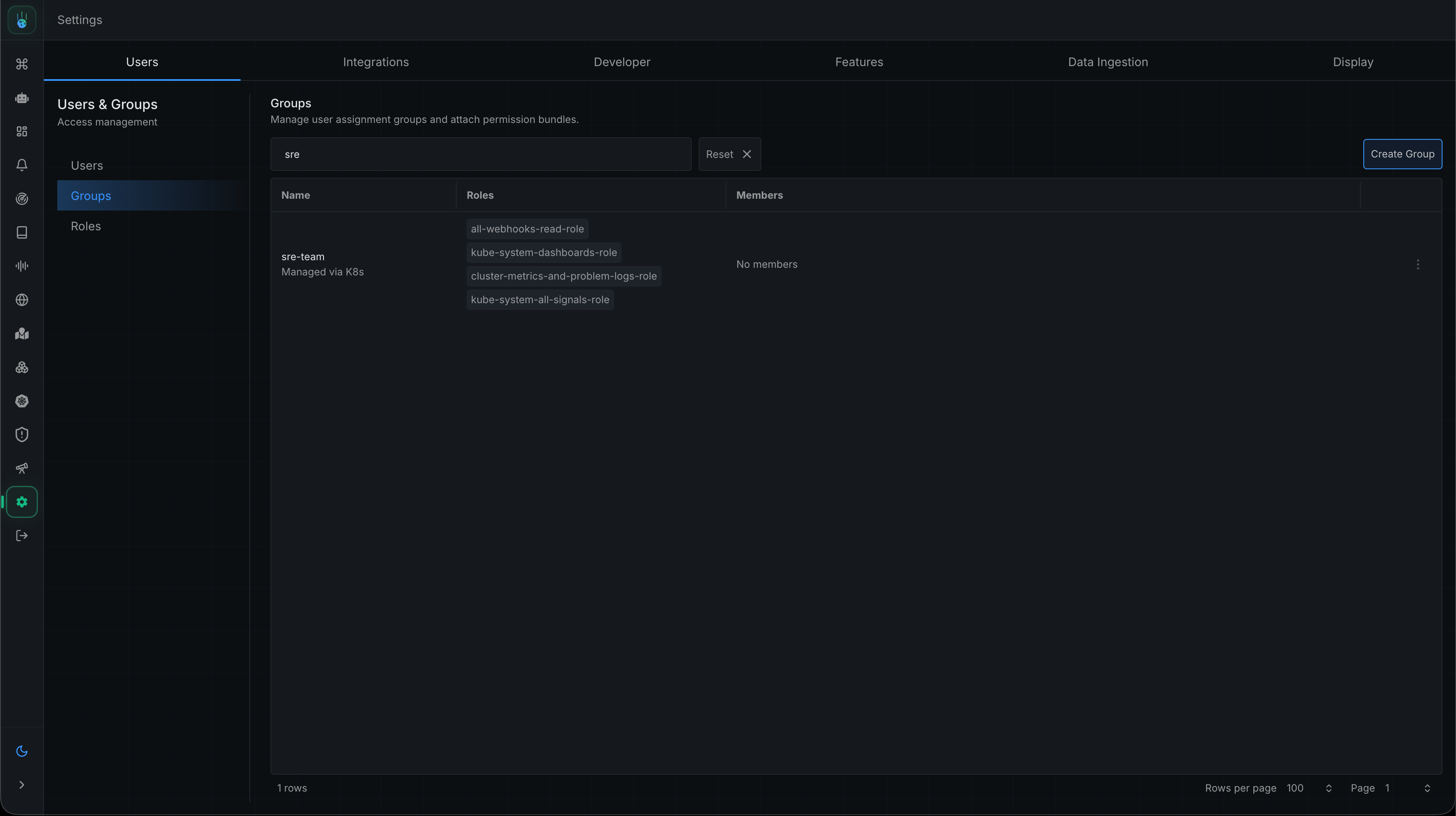 * Each rule resource creates one managed role, named after the rule — for example, the Step 2 rule produces `kube-system-all-signals-role`. Opening the **Roles** tab shows the permissions Metoro derived from each, including the environment and namespace scoping it added automatically (note how the telemetry role scopes traces by `server.namespace` and Kubernetes resources by `Namespace`, while other signals use `namespace`).
* The roles and their permissions carry a **Managed via K8s** label and are read-only. To change them, edit the custom resource in Kubernetes, then use **Sync rules** for an immediate refresh.
* Each rule resource creates one managed role, named after the rule — for example, the Step 2 rule produces `kube-system-all-signals-role`. Opening the **Roles** tab shows the permissions Metoro derived from each, including the environment and namespace scoping it added automatically (note how the telemetry role scopes traces by `server.namespace` and Kubernetes resources by `Namespace`, while other signals use `namespace`).
* The roles and their permissions carry a **Managed via K8s** label and are read-only. To change them, edit the custom resource in Kubernetes, then use **Sync rules** for an immediate refresh.
 ### Step 7: Author a dashboard in kube-system
The resource rule from Step 5 lets `sre-team` create `MetoroDashboard` objects in `kube-system`. Here is a node CPU and memory dashboard the team might apply — note the `namespace: kube-system`, which is what brings it under the Step 5 grant:
```yaml theme={null}
apiVersion: observability.metoro.io/v1alpha1
kind: MetoroDashboard
metadata:
name: node-cpu-memory
namespace: kube-system
spec:
title: Node CPU & Memory
settings:
defaultTimeRange: "1h"
layoutVersion: 2
content:
title: Node CPU & Memory
widgets:
# ---- CPU ----
- type: chart
position:
type: absolute
absolute: { x: 0, "y": 0, w: 12, h: 12 }
chart:
title: Node CPU usage (cores)
description: CPU cores in use per node (excludes idle).
chartType: line
expression:
queryMode: metoroql
metoroQLQueries:
- query: sum(rate(node_resources_cpu_usage_seconds_total{mode!="idle"})) by (kubernetes.io/hostname)
bucketSize: 60
displaySettings:
label: "{{kubernetes.io/hostname}}"
unitOverride: cores
lineSettings: { lineType: solid, lineColour: "#2DD881" }
- type: stat
position:
type: absolute
absolute: { x: 12, "y": 0, w: 6, h: 12 }
stat:
title: Cluster CPU usage (cores)
expression:
queryMode: metoroql
metoroQLQuery:
query: sum(rate(node_resources_cpu_usage_seconds_total{mode!="idle"}))
bucketSize: 60
reduceAggregation: avg
displaySettings:
globalSettings: { valuePrecision: 2, unitOverride: cores }
- type: stat
position:
type: absolute
absolute: { x: 18, "y": 0, w: 6, h: 12 }
stat:
title: Cluster CPU capacity (cores)
expression:
queryMode: metoroql
metoroQLQuery:
query: sum(node_resources_cpu_logical_cores)
bucketSize: 60
reduceAggregation: avg
displaySettings:
globalSettings: { valuePrecision: 0, unitOverride: cores }
# ---- Memory ----
- type: chart
position:
type: absolute
absolute: { x: 0, "y": 12, w: 12, h: 12 }
chart:
title: Node memory used (bytes)
description: Physical memory in use per node (total minus available).
chartType: line
expression:
queryMode: metoroql
metoroQLQueries:
- query: sum(node_resources_memory_total_bytes) by (kubernetes.io/hostname) - sum(node_resources_memory_available_bytes) by (kubernetes.io/hostname)
bucketSize: 60
displaySettings:
label: "{{kubernetes.io/hostname}}"
unitOverride: "By"
lineSettings: { lineType: solid, lineColour: "#4299E1", areaOpacity: 0.2 }
- type: stat
position:
type: absolute
absolute: { x: 12, "y": 12, w: 6, h: 12 }
stat:
title: Cluster memory used
expression:
queryMode: metoroql
metoroQLQuery:
query: sum(node_resources_memory_total_bytes) - sum(node_resources_memory_available_bytes)
bucketSize: 60
reduceAggregation: avg
displaySettings:
globalSettings: { valuePrecision: 0, unitOverride: "By" }
- type: stat
position:
type: absolute
absolute: { x: 18, "y": 12, w: 6, h: 12 }
stat:
title: Cluster memory capacity
expression:
queryMode: metoroql
metoroQLQuery:
query: sum(node_resources_memory_total_bytes)
bucketSize: 60
reduceAggregation: avg
displaySettings:
globalSettings: { valuePrecision: 0, unitOverride: "By" }
```
## Reference
### Telemetry rules
`MetoroNamespaceTelemetryRule` (namespaced) and `MetoroClusterTelemetryRule` (cluster-scoped) share the same spec:
| Field | Type | Required | Description |
| ----------------------------- | ---------- | ------------------- | -------------------------------------------------------------------------------------------------------------- |
| `spec.groups` | `[]string` | yes | Group names this rule grants access to. 1–256 entries. |
| `spec.rules` | `[]object` | yes | Independent allow-grants; effective access is their union. 1–256 entries. |
| `rules[].signals` | `[]string` | yes | Any of `logs`, `metrics`, `traces`, `profiles`, `kubernetesResources`. |
| `rules[].match` | `object` | no | Optional attribute selector narrowing the inherited scope. |
| `match.matchExpressions` | `[]object` | yes, within `match` | 1–64 expressions, ANDed together. |
| `matchExpressions[].key` | `string` | yes | Telemetry attribute key, e.g. `service.name`, `severity`, `metric.name`, `status.code`, or a custom attribute. |
| `matchExpressions[].operator` | `string` | yes | `In`, `NotIn`, `RegexIn`, `Exists`, `DoesNotExist`. |
| `matchExpressions[].values` | `[]string` | conditional | Required for `In`/`NotIn`/`RegexIn`; must be omitted for `Exists`/`DoesNotExist`. Up to 256 values. |
Implicit scoping added by Metoro (you don't write these expressions yourself):
| Signal | Namespaced rule scoped by | Cluster rule scoped by |
| ----------------------------- | ---------------------------------- | ---------------------- |
| `logs`, `metrics`, `profiles` | `environment` + `namespace` | `environment` |
| `traces` | `environment` + `server.namespace` | `environment` |
| `kubernetesResources` | `Environment` + `Namespace` | `Environment` |
Custom attribute keys are supported for `logs`, `metrics`, `traces`, and `profiles` and are case-sensitive. For example, `team` and `Team` are different keys. Custom attributes are matched against the signal's attribute map: logs and metrics use `Attributes`, profiles use `ResourceAttributes`, and traces match either `SpanAttributes` or `ResourceAttributes`. `kubernetesResources` only supports its named resource fields such as `Environment`, `Namespace`, `Kind`, and `ResourceName`; labels, annotations, and YAML paths are not generic custom telemetry attributes.
### Resource rules
`MetoroNamespaceResourceRule` (namespaced) and `MetoroClusterResourceRule` (cluster-scoped) share the same spec:
| Field | Type | Required | Description |
| ------------------- | ---------- | -------- | ------------------------------------------------------------------------------ |
| `spec.groups` | `[]string` | yes | Group names this rule grants access to. 1–256 entries. |
| `spec.rules` | `[]object` | yes | Independent allow-grants; effective access is their union. 1–256 entries. |
| `rules[].resources` | `[]string` | yes | Any of `alerts`, `dashboards`, `webhooks`. |
| `rules[].verbs` | `[]string` | yes | Any of `create`, `read`, `update`, `delete`. |
| `rules[].path` | `string` | no | Relative subfolder narrowing the grant. No leading `/`, no wildcards, no `..`. |
Each rule grants its verbs on the permission path:
```
//kubernetes-managed/[/][/]/*
```
where `` is present only for namespaced rules.
### kubectl tips
All five kinds are in the `metoro` and `metoro-rbac` categories, so you can list every Metoro RBAC object at once:
```bash theme={null}
kubectl get metoro-rbac -A
```
Short names work as usual, e.g. `kubectl get mntelrules -n kube-system`, and the printer columns show each rule's groups and grants at a glance.
## How rules combine
The same [evaluation model](/user-management/rbac#how-access-is-evaluated) as the rest of Metoro RBAC applies:
* All grants are **allow-only and additive** — the union of every rule, across every resource, in every cluster.
* Within one `matchExpressions` list, expressions are **ANDed**.
* Across `rules` entries and across separate rule resources, grants are **ORed**.
* Telemetry is **deny-by-default**: a group with no telemetry grants sees no telemetry.
## Gotchas
* **Create the group first.** A rule that names a group that doesn't exist yet is skipped for that group until the group is created — the rest of the rule still applies.
* **Built-in groups are off limits.** Rules cannot bind roles to Metoro's built-in default groups; bind to groups you created.
* **`values` and operators must agree.** `In`, `NotIn`, and `RegexIn` require a non-empty `values` list; `Exists` and `DoesNotExist` require `values` to be omitted. The CRD schema rejects mismatches at apply time.
* **`path` is relative.** No leading `/`, no wildcards, no `..` — the environment (and namespace) prefix is always added by Metoro.
* **Resource rules only reach Kubernetes-managed resources.** They grant access under `/…/kubernetes-managed/…`, i.e. to `MetoroAlert`/`MetoroDashboard`/`MetoroWebhook` objects — never to alerts, dashboards, or webhooks created in the UI.
* **Everything managed from Kubernetes is read-only in the UI.** Edit the custom resource instead. Allow about a minute for the exporter to send your change to the hub; once it has arrived, **Sync rules** applies it immediately rather than waiting for the next automatic reconcile.
### Step 7: Author a dashboard in kube-system
The resource rule from Step 5 lets `sre-team` create `MetoroDashboard` objects in `kube-system`. Here is a node CPU and memory dashboard the team might apply — note the `namespace: kube-system`, which is what brings it under the Step 5 grant:
```yaml theme={null}
apiVersion: observability.metoro.io/v1alpha1
kind: MetoroDashboard
metadata:
name: node-cpu-memory
namespace: kube-system
spec:
title: Node CPU & Memory
settings:
defaultTimeRange: "1h"
layoutVersion: 2
content:
title: Node CPU & Memory
widgets:
# ---- CPU ----
- type: chart
position:
type: absolute
absolute: { x: 0, "y": 0, w: 12, h: 12 }
chart:
title: Node CPU usage (cores)
description: CPU cores in use per node (excludes idle).
chartType: line
expression:
queryMode: metoroql
metoroQLQueries:
- query: sum(rate(node_resources_cpu_usage_seconds_total{mode!="idle"})) by (kubernetes.io/hostname)
bucketSize: 60
displaySettings:
label: "{{kubernetes.io/hostname}}"
unitOverride: cores
lineSettings: { lineType: solid, lineColour: "#2DD881" }
- type: stat
position:
type: absolute
absolute: { x: 12, "y": 0, w: 6, h: 12 }
stat:
title: Cluster CPU usage (cores)
expression:
queryMode: metoroql
metoroQLQuery:
query: sum(rate(node_resources_cpu_usage_seconds_total{mode!="idle"}))
bucketSize: 60
reduceAggregation: avg
displaySettings:
globalSettings: { valuePrecision: 2, unitOverride: cores }
- type: stat
position:
type: absolute
absolute: { x: 18, "y": 0, w: 6, h: 12 }
stat:
title: Cluster CPU capacity (cores)
expression:
queryMode: metoroql
metoroQLQuery:
query: sum(node_resources_cpu_logical_cores)
bucketSize: 60
reduceAggregation: avg
displaySettings:
globalSettings: { valuePrecision: 0, unitOverride: cores }
# ---- Memory ----
- type: chart
position:
type: absolute
absolute: { x: 0, "y": 12, w: 12, h: 12 }
chart:
title: Node memory used (bytes)
description: Physical memory in use per node (total minus available).
chartType: line
expression:
queryMode: metoroql
metoroQLQueries:
- query: sum(node_resources_memory_total_bytes) by (kubernetes.io/hostname) - sum(node_resources_memory_available_bytes) by (kubernetes.io/hostname)
bucketSize: 60
displaySettings:
label: "{{kubernetes.io/hostname}}"
unitOverride: "By"
lineSettings: { lineType: solid, lineColour: "#4299E1", areaOpacity: 0.2 }
- type: stat
position:
type: absolute
absolute: { x: 12, "y": 12, w: 6, h: 12 }
stat:
title: Cluster memory used
expression:
queryMode: metoroql
metoroQLQuery:
query: sum(node_resources_memory_total_bytes) - sum(node_resources_memory_available_bytes)
bucketSize: 60
reduceAggregation: avg
displaySettings:
globalSettings: { valuePrecision: 0, unitOverride: "By" }
- type: stat
position:
type: absolute
absolute: { x: 18, "y": 12, w: 6, h: 12 }
stat:
title: Cluster memory capacity
expression:
queryMode: metoroql
metoroQLQuery:
query: sum(node_resources_memory_total_bytes)
bucketSize: 60
reduceAggregation: avg
displaySettings:
globalSettings: { valuePrecision: 0, unitOverride: "By" }
```
## Reference
### Telemetry rules
`MetoroNamespaceTelemetryRule` (namespaced) and `MetoroClusterTelemetryRule` (cluster-scoped) share the same spec:
| Field | Type | Required | Description |
| ----------------------------- | ---------- | ------------------- | -------------------------------------------------------------------------------------------------------------- |
| `spec.groups` | `[]string` | yes | Group names this rule grants access to. 1–256 entries. |
| `spec.rules` | `[]object` | yes | Independent allow-grants; effective access is their union. 1–256 entries. |
| `rules[].signals` | `[]string` | yes | Any of `logs`, `metrics`, `traces`, `profiles`, `kubernetesResources`. |
| `rules[].match` | `object` | no | Optional attribute selector narrowing the inherited scope. |
| `match.matchExpressions` | `[]object` | yes, within `match` | 1–64 expressions, ANDed together. |
| `matchExpressions[].key` | `string` | yes | Telemetry attribute key, e.g. `service.name`, `severity`, `metric.name`, `status.code`, or a custom attribute. |
| `matchExpressions[].operator` | `string` | yes | `In`, `NotIn`, `RegexIn`, `Exists`, `DoesNotExist`. |
| `matchExpressions[].values` | `[]string` | conditional | Required for `In`/`NotIn`/`RegexIn`; must be omitted for `Exists`/`DoesNotExist`. Up to 256 values. |
Implicit scoping added by Metoro (you don't write these expressions yourself):
| Signal | Namespaced rule scoped by | Cluster rule scoped by |
| ----------------------------- | ---------------------------------- | ---------------------- |
| `logs`, `metrics`, `profiles` | `environment` + `namespace` | `environment` |
| `traces` | `environment` + `server.namespace` | `environment` |
| `kubernetesResources` | `Environment` + `Namespace` | `Environment` |
Custom attribute keys are supported for `logs`, `metrics`, `traces`, and `profiles` and are case-sensitive. For example, `team` and `Team` are different keys. Custom attributes are matched against the signal's attribute map: logs and metrics use `Attributes`, profiles use `ResourceAttributes`, and traces match either `SpanAttributes` or `ResourceAttributes`. `kubernetesResources` only supports its named resource fields such as `Environment`, `Namespace`, `Kind`, and `ResourceName`; labels, annotations, and YAML paths are not generic custom telemetry attributes.
### Resource rules
`MetoroNamespaceResourceRule` (namespaced) and `MetoroClusterResourceRule` (cluster-scoped) share the same spec:
| Field | Type | Required | Description |
| ------------------- | ---------- | -------- | ------------------------------------------------------------------------------ |
| `spec.groups` | `[]string` | yes | Group names this rule grants access to. 1–256 entries. |
| `spec.rules` | `[]object` | yes | Independent allow-grants; effective access is their union. 1–256 entries. |
| `rules[].resources` | `[]string` | yes | Any of `alerts`, `dashboards`, `webhooks`. |
| `rules[].verbs` | `[]string` | yes | Any of `create`, `read`, `update`, `delete`. |
| `rules[].path` | `string` | no | Relative subfolder narrowing the grant. No leading `/`, no wildcards, no `..`. |
Each rule grants its verbs on the permission path:
```
//kubernetes-managed/[/][/]/*
```
where `` is present only for namespaced rules.
### kubectl tips
All five kinds are in the `metoro` and `metoro-rbac` categories, so you can list every Metoro RBAC object at once:
```bash theme={null}
kubectl get metoro-rbac -A
```
Short names work as usual, e.g. `kubectl get mntelrules -n kube-system`, and the printer columns show each rule's groups and grants at a glance.
## How rules combine
The same [evaluation model](/user-management/rbac#how-access-is-evaluated) as the rest of Metoro RBAC applies:
* All grants are **allow-only and additive** — the union of every rule, across every resource, in every cluster.
* Within one `matchExpressions` list, expressions are **ANDed**.
* Across `rules` entries and across separate rule resources, grants are **ORed**.
* Telemetry is **deny-by-default**: a group with no telemetry grants sees no telemetry.
## Gotchas
* **Create the group first.** A rule that names a group that doesn't exist yet is skipped for that group until the group is created — the rest of the rule still applies.
* **Built-in groups are off limits.** Rules cannot bind roles to Metoro's built-in default groups; bind to groups you created.
* **`values` and operators must agree.** `In`, `NotIn`, and `RegexIn` require a non-empty `values` list; `Exists` and `DoesNotExist` require `values` to be omitted. The CRD schema rejects mismatches at apply time.
* **`path` is relative.** No leading `/`, no wildcards, no `..` — the environment (and namespace) prefix is always added by Metoro.
* **Resource rules only reach Kubernetes-managed resources.** They grant access under `/…/kubernetes-managed/…`, i.e. to `MetoroAlert`/`MetoroDashboard`/`MetoroWebhook` objects — never to alerts, dashboards, or webhooks created in the UI.
* **Everything managed from Kubernetes is read-only in the UI.** Edit the custom resource instead. Allow about a minute for the exporter to send your change to the hub; once it has arrived, **Sync rules** applies it immediately rather than waiting for the next automatic reconcile.