> ## Documentation Index
> Fetch the complete documentation index at: https://metoro.io/docs/llms.txt
> Use this file to discover all available pages before exploring further.
# Issues
> Track recurring issues that Metoro has identified across its AI investigation workflows, their investigation history, and related remediation work
## Overview
**Issues** is the durable list of production issues that Metoro has identified across its AI investigation workflows.
Instead of treating each investigation as an isolated event, Metoro groups repeated recurrences of the same underlying problem into a single issue so your team can track status, history, and follow-up work in one place.
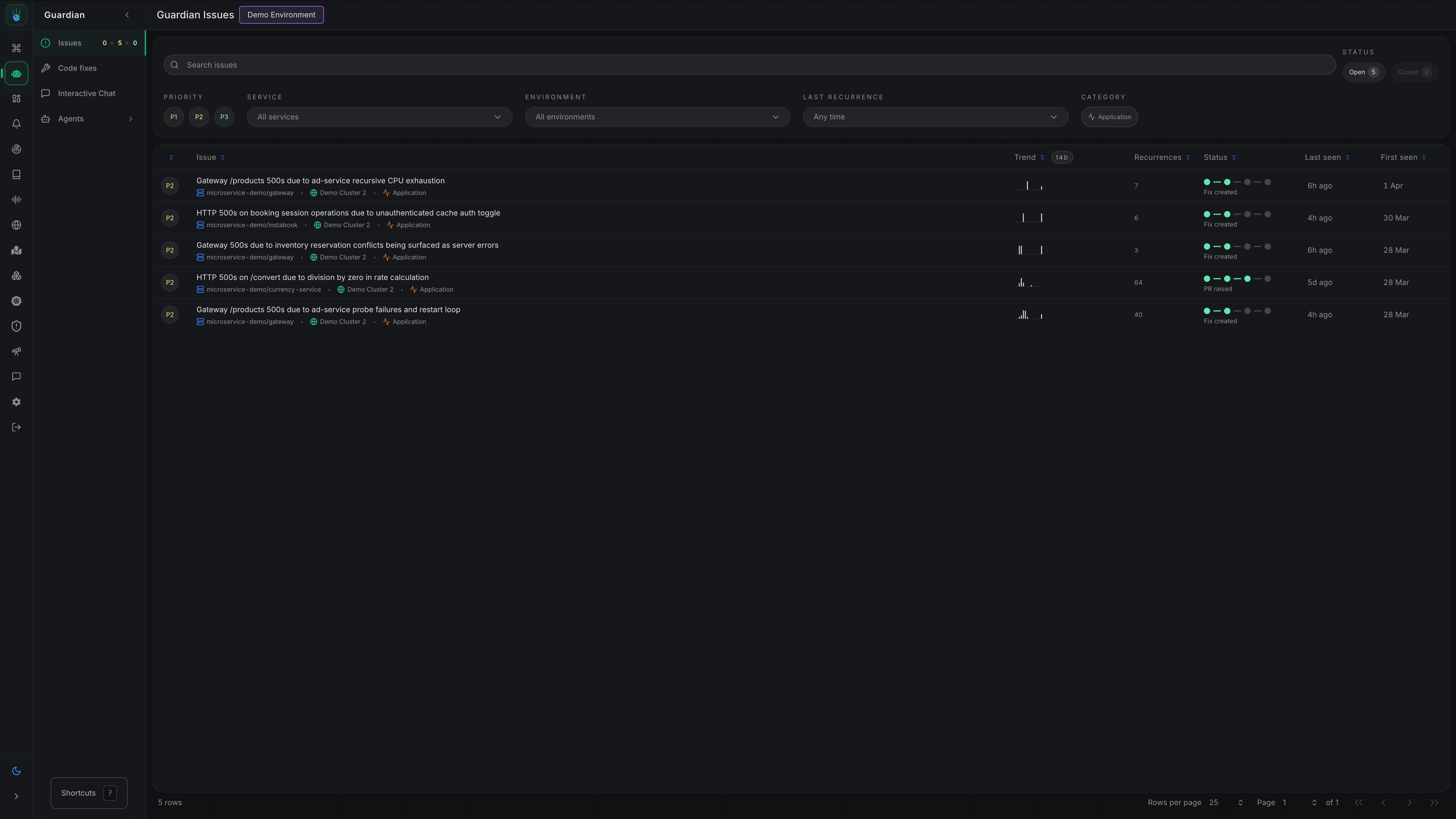 From the **Issues** page, you can:
* See which production problems are still open
* Prioritize by severity and recurrence
* Review the latest investigation behind an issue
* Follow related code fixes and remediation work over time
## How Issues Work
When Metoro determines that an investigation reflects a real production issue, it can **create** or **update** an issue. Each issue becomes a long-lived record of that underlying problem, including:
* A title and summary
* Open or closed status
* Priority (`P1`, `P2`, `P3`)
* Category (`application` or `infrastructure`)
* Affected services and environments
* Recurrence history and last seen time
* Links to related investigations and generated code fixes
## Issue Details
Opening an issue gives you the full context Metoro has accumulated about that problem.
From the **Issues** page, you can:
* See which production problems are still open
* Prioritize by severity and recurrence
* Review the latest investigation behind an issue
* Follow related code fixes and remediation work over time
## How Issues Work
When Metoro determines that an investigation reflects a real production issue, it can **create** or **update** an issue. Each issue becomes a long-lived record of that underlying problem, including:
* A title and summary
* Open or closed status
* Priority (`P1`, `P2`, `P3`)
* Category (`application` or `infrastructure`)
* Affected services and environments
* Recurrence history and last seen time
* Links to related investigations and generated code fixes
## Issue Details
Opening an issue gives you the full context Metoro has accumulated about that problem.
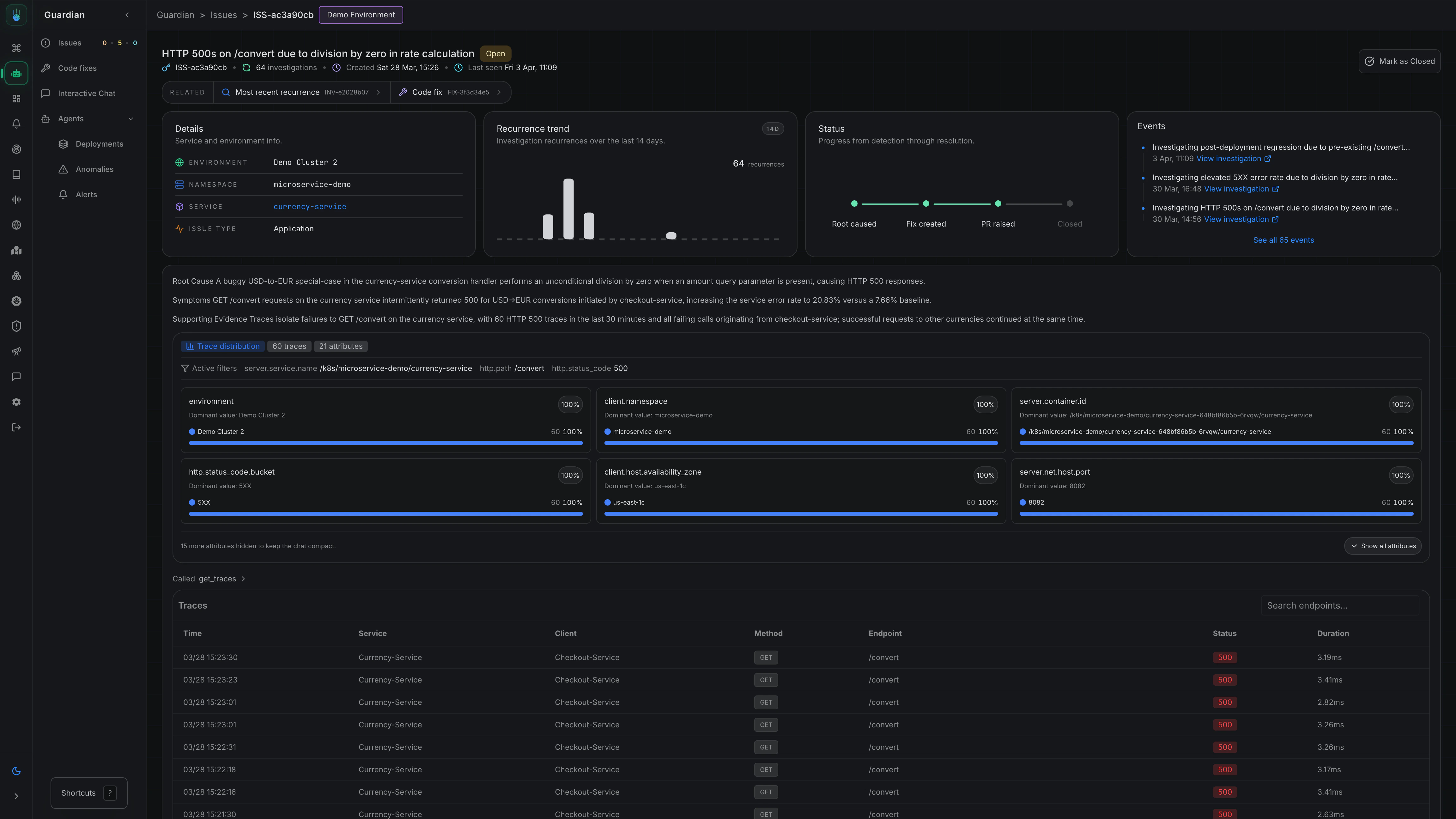 The issue details view includes:
* The issue description and current status
* Created time and last seen time
* Environment, namespace, service, and category
* A recurrence trend and status journey
* An event timeline showing related investigations and activity
* Related resources such as the most recent investigation and any generated code fix
You can also mark an issue as closed or reopen it later if the same problem needs active follow-up again.
## Notifications
If you want your team to be notified when Metoro creates a new issue, you can use the Issue Notification feature.
Go to **Settings** → **Features** → **Issue Detection** to set up notification filters and channels.
[Take me there](https://us-east.metoro.io/settings?tab=features\&subtab=issue-detection)
[Learn more about AI SRE notifications →](/ai-sre/notifications)
## Related Docs
Understand how AI SRE fits into Metoro's broader workflows.
Learn how Metoro detects abnormal behavior and investigates it automatically.
Investigate firing alerts and continue to root cause when needed.
Add code context and generated fixes to investigations and issues.
The issue details view includes:
* The issue description and current status
* Created time and last seen time
* Environment, namespace, service, and category
* A recurrence trend and status journey
* An event timeline showing related investigations and activity
* Related resources such as the most recent investigation and any generated code fix
You can also mark an issue as closed or reopen it later if the same problem needs active follow-up again.
## Notifications
If you want your team to be notified when Metoro creates a new issue, you can use the Issue Notification feature.
Go to **Settings** → **Features** → **Issue Detection** to set up notification filters and channels.
[Take me there](https://us-east.metoro.io/settings?tab=features\&subtab=issue-detection)
[Learn more about AI SRE notifications →](/ai-sre/notifications)
## Related Docs
Understand how AI SRE fits into Metoro's broader workflows.
Learn how Metoro detects abnormal behavior and investigates it automatically.
Investigate firing alerts and continue to root cause when needed.
Add code context and generated fixes to investigations and issues.